Overview
REST is a framework designed to build APIs in a easiest way. REST APIs expose HTTP resources.
Example:
URL: http://localhost:8000/v1/customers/v1/customers from the URL above is called an HTTP resource. There are best practices for naming resources and structuring paths.
/v1 specifies the API version.
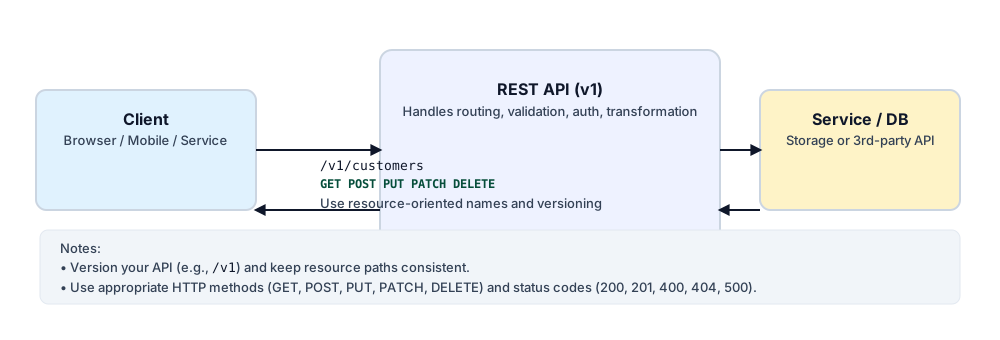
HTTP Methods
The URL above uses HTTP methods to indicate the desired action. Important methods include:
- HTTP GET: Used to retrieve data from the target application. GET does not have a request body; it relies on URL parameters and query parameters to fetch data. It should not change state on the server.
- HTTP POST: Used to create data in the target application. POST requests include a body (and optionally query or path parameters) and change the state of the target system.
- HTTP PUT: Used to update or replace data in the target application. PUT includes a body and changes the state of the target system.
- HTTP DELETE: Used to delete data in the target application. DELETE may include parameters and changes the state of the target system.
- HTTP PATCH: Used to apply partial updates to an existing resource. PATCH includes a body with the partial changes and changes the state of the target system.
Schemas, examples & validation
APIs should include schemas, examples, and security definitions so requests can adhere strictly to the expected shapes and be validated. Use OpenAPI/Swagger or similar to document request/response schemas and examples.
HTTP response codes
When designing APIs, consider the HTTP response codes you will return; common ones include:
- 200: Successful response.
- 201: Resource created.
- 400: Bad request (client error, e.g., validation failure).
- 404: Resource not found.
- 500: Server error (target application down or internal error).
Best practices (quick checklist)
- Use consistent, resource-oriented naming (e.g.,
/v1/users,/v1/orders). - Version your API in the path or via headers.
- Document using OpenAPI / Swagger and include examples.
- Validate requests against schemas and return helpful error messages.
- Use appropriate HTTP status codes and idempotent methods where applicable.
- Implement authentication and authorization (API keys, OAuth2, JWT).
- Rate-limit abusive clients and log requests for observability.
Example: OpenAPI snippet
Here is a minimal OpenAPI (YAML) example that documents a simple resource and a POST operation to create a record:
# openapi: 3.0.1
info:
  title: Sample API
  version: '1.0.0'
paths:
  /v1/tables:
    post:
      summary: Create a table
      requestBody:
        required: true
        content:
          application/json:
            schema:
              type: object
              properties:
                name:
                  type: string
      responses:
        '201':
          description: Created
        '400':
          description: Validation error
Example curl request
curl -X POST "https://api.example.com/v1/tables" \
  -H "Content-Type: application/json" \
  -d '{"name":"customers"}'
Example request & response JSON
Request body:
{
  "name": "customers"
}
Successful response (201):
{
  "id": "tbl_1234",
  "name": "customers",
  "created_at": "2025-12-13T10:00:00Z"
}